


NewsBreak Lite
4.7408.00 Reviews
App Specs
- Version
- 26.33.0
- Updated On
- License
- Free
- Downloads
- 100,000+
- Developer
- Particle Media Inc.
- Categories
- News & Magazines
- Platform
- Android, iOS
Screenshots
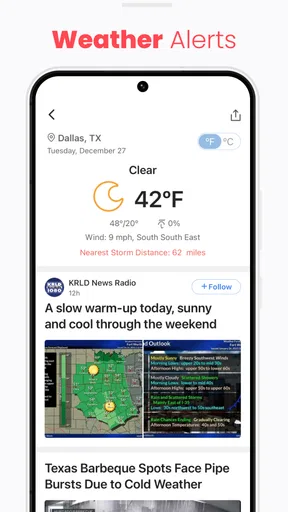
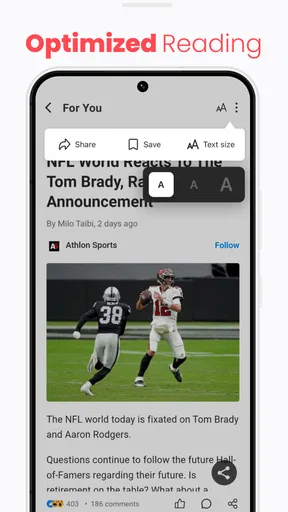
 Analysis by AppCompare
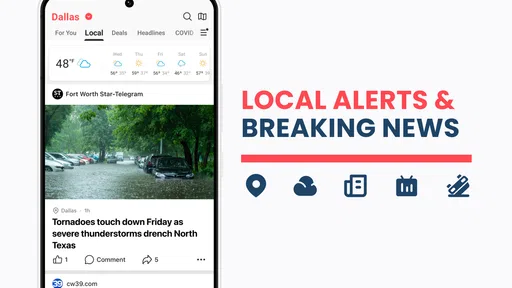
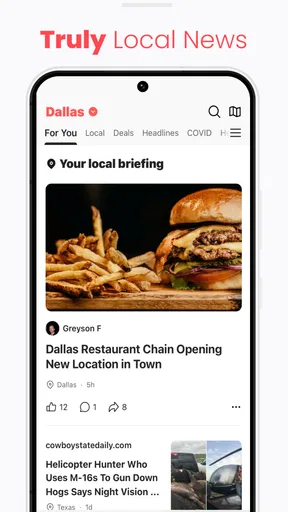
NewsBreak Lite is a local news app from Particle Media Inc. that focuses on one especially useful idea: bringing neighborhood headlines and alerts into the same place as broader news. I found that this narrow focus changes how I use it. Instead of opening a general news app only when I already know what I want to read, I can use this lighter edition as a quick check on what may affect my immediate area.
The application is free to install and is rated for Everyone 10+, which makes it approachable for a wide range of readers. It belongs to the News & Magazines category, and its store presence shows a 4.7 average from around 3.5 thousand ratings, with more than 100 thousand installs. Those figures suggest that the concept is easy to understand: people want a simple way to reconnect with nearby news without building a reading routine around several separate sources.
Why local alerts are the app’s real strength
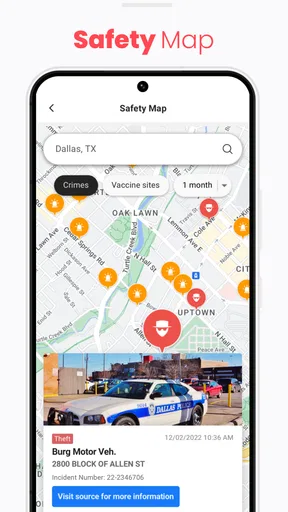
The most important capability here is not simply displaying articles. It is the attempt to make local news alerts useful in everyday life. National headlines can be interesting, but neighborhood information is often more practical: a change affecting a nearby road, a community announcement, a local event, or a developing story that has not yet become important enough for a national outlet.
That difference matters because local information has a shorter useful window. If I hear about a national story later in the day, I may still understand it. If I learn about a nearby disruption after I have already left home, the information may no longer help me. NewsBreak Lite is most convincing when it acts as a brief local-awareness tool rather than as a complete replacement for every publication I read.
I also like the idea of separating the decision to stay informed from the effort of searching. A normal web search requires me to think of a topic, choose words, compare results, and decide which source deserves attention. A local alert can bring a relevant headline to me before I have formed that search query. That convenience is the practical value of the app, especially for people who want awareness without spending a long time scrolling.
There is a trade-off, though. Alerts are helpful only when they remain meaningful. Too many notifications can turn a useful local signal into background noise, and a headline alone may not provide enough context for a serious decision. I would treat the alert as a prompt to investigate, not as the final word on an emergency, public-safety issue, or complicated local debate.
What the lighter format changes
The “Lite” identity sets a different expectation from a large, all-purpose news platform. I approach it as a focused utility: open it, scan what is happening nearby, read the items that matter, and leave. That makes it a better fit for short sessions than for someone who wants a deep, magazine-style reading experience every time.
Worth Reading Before You Choose

EA SPORTS FC Mobile 26 Is a Bigger Football Game, but It Takes Time

Flipboard Shows What News Apps Must Do Beyond the Feed

Switching to Android Auto Means Rethinking Your Driving Routine

Google Calendar Makes a Crowded Week Easier to Manage

Ludo King Makes the Most of the Minutes Between Plans

Baby Panda World Brings Quick Play to Modern Phones, but Its Game Library Feels Busy
This focus can be valuable on an older phone or on a device where I prefer to keep apps uncomplicated. The listed minimum operating system is Android 8.0, so it is not restricted to only the newest Android devices. The current version is 26.33.0, which also gives users a clear version reference when checking whether their installation is current.
The lighter approach does not automatically mean that every screen will feel minimal. News apps still need to present headlines, article pages, alerts, and navigation, and the amount of information can feel busy when several stories compete for attention. My advice is to judge the app by the speed and relevance of its local scan, not by expecting it to behave like a bare notification panel.
Using it as a daily local check
My preferred routine would be to check the app at a natural transition point, such as before leaving for work or after arriving home. I would first scan the local headlines rather than opening every notification immediately. Then I would choose only the stories that could affect my plans, family, commute, or neighborhood interests.
This workflow avoids a common mistake with news alerts: treating every interruption as urgent. A headline can be useful without requiring instant action. By opening the app when I have a minute to read, I can decide whether a story is relevant, whether it needs a second source, or whether it is simply something to remember.
For a more organized routine, I would use the app alongside a broader news source rather than asking it to do everything. NewsBreak Lite can handle the local pulse, while a newspaper app, public broadcaster, or trusted specialist source can provide deeper reporting on major subjects. This division of labor is more realistic than expecting a lightweight local-news tool to replace careful reading across every topic.
One non-obvious benefit of this approach is that it can reduce aimless news consumption. Instead of beginning with a large national feed and drifting through unrelated stories, I can begin with the place where information is most immediately actionable. If nothing local needs attention, I can close the app quickly. That makes the experience more purposeful than endless browsing.
A realistic morning scenario
Imagine that I am preparing to leave for work and want to know whether the day may unfold differently from usual. I open NewsBreak Lite for a short local scan. A nearby headline may tell me that something has changed in the community, while another item may simply be interesting background. I do not need to read everything. I can identify the one or two stories that might affect my route or plans and then verify important details through the relevant official or established source.
That scenario shows both the strength and the boundary of the app. The strength is speed: I am reminded to look at local information before the day gets busy. The boundary is authority: a headline in an app should not be my only basis for making a safety-sensitive decision. For urgent instructions, closures, or official guidance, I would still consult the responsible local authority.
The same routine can work in the evening. Instead of checking several social feeds, I can use the app to see what developed nearby during the day. This is particularly useful for people who want to feel connected to their area but do not have time to follow individual local outlets continuously.
Where it compares well with usual alternatives
Compared with a general national news app, NewsBreak Lite has a clearer local purpose. Broad platforms are usually better when I want international coverage, business reporting, science, entertainment, or a large selection of long-form articles. They can also be better for following a specific national story over several days. NewsBreak Lite makes more sense when geographic relevance matters more than breadth.
Compared with searching the web manually, the app removes the need to invent a search phrase every time I want a local update. That is convenient, but search remains better when I already know the exact topic or need to compare several sources. Search also gives me more control over the origin of information, while an alert-led app emphasizes convenience and discovery.
Compared with following local social-media groups, the app may offer a calmer starting point because I am looking at news headlines rather than a stream shaped entirely by personal posts and reactions. Social groups can still be faster for firsthand community discussion, but they may also require more effort to separate useful information from speculation. I would use them as a supplement, not as a substitute for checking reliable reporting.
Compared with a dedicated local newspaper application, NewsBreak Lite may be more useful for someone who wants a broad local scan instead of one publication’s coverage. A newspaper app can be the better choice when I value a particular newsroom, its reporting style, or its deeper local investigations. The right choice depends on whether I want aggregation and convenience or a closer relationship with one publisher.
The trade-offs I noticed before recommending it
The biggest limitation is that convenience can encourage shallow reading. A notification gives me a reason to open an article, but it does not guarantee that I will understand the full situation. Local stories often depend on details, timing, and context. I would avoid sharing a dramatic headline immediately and would read beyond the first line before forming an opinion.
Another point to consider is attention. A local-news app can become distracting if I allow every update to interrupt work, study, family time, or sleep. I would be selective about when I want alerts and would prefer a routine that lets me review them in batches. The app is most useful when it supports my day rather than constantly competing with it.
There are also commercial considerations. Although the app is free, in-app purchases range from one dollar to fifty-nine dollars and ninety-nine cents per item. That does not make the basic download unsuitable, but it does mean I would pay attention to any purchase screen and understand what an optional transaction offers before confirming it. Anyone looking for a completely purchase-free experience should keep that possibility in mind.
These trade-offs do not cancel out the main benefit, but they affect who should install it. I would not choose NewsBreak Lite as my only source for major public events, medical decisions, legal questions, or urgent safety instructions. In those situations, I want direct official information and detailed reporting. I would use this app to notice a local subject, then follow it through more authoritative or specialized channels.
Small habits that make the experience better
First, I would treat the app as a filter for attention, not a test of how many headlines I can consume. A quick scan followed by one carefully chosen article is more useful than opening every alert. This is especially important when a story is emotionally charged or appears to involve a rapidly changing situation.
Second, I would separate “interesting” from “actionable.” A local feature may help me understand my community, while a practical update may affect my route or schedule. Keeping those categories in mind prevents me from assuming that every headline deserves the same urgency.
Third, I would use the app to create questions for deeper reading. If a headline mentions a local change, I would ask who made the decision, when it takes effect, and where the original details can be checked. This turns a short alert into a starting point for informed action rather than a conclusion.
Finally, I would periodically reconsider whether the local focus still matches my needs. If I move to another area, travel frequently, or mainly want national and international reporting, the app may become less central to my routine. Its value depends heavily on the connection between the coverage it surfaces and the places I actually care about.
Who will gain the most from it
I think the strongest audience is people who want a quick connection to their surroundings without committing to a single local publication. It can suit commuters, parents, students, renters, homeowners, and anyone who wants to notice community developments before hearing about them casually from someone else.
It may also help readers who feel overwhelmed by large news feeds. Beginning with nearby headlines creates a manageable entry point. I can decide whether I want more information after seeing what is relevant locally, instead of being presented with an enormous list of unrelated stories.
People who should skip it are those seeking a rigorous, single-source newspaper experience, extensive international coverage, or a fully official alert system. They may be happier with a dedicated publication, a public information channel, or a specialist app. NewsBreak Lite is not the right answer simply because it is free; the local-alert focus has to match the reader’s purpose.
Particle Media Inc. has positioned this as a straightforward news and magazine app, and the free entry point makes it easy to test whether the local approach fits. The Everyone 10+ rating also makes it broadly accessible, though parents should still remember that news topics can vary in seriousness even when an app carries a general age classification.
My final view after using the local-first approach
NewsBreak Lite is at its best when it turns local awareness into a short, repeatable habit. I would recommend it to a friend who wants nearby headlines and alerts without manually checking several sources each morning. Its strongest effect is not making me read more news; it is helping me notice the information most likely to matter to my immediate surroundings.
I would keep expectations realistic. It is not a replacement for official emergency communication, careful investigative reporting, or a broad national news subscription. Notifications need judgment, headlines need context, and optional in-app purchases deserve attention. Used with those limits in mind, the app has a clear role: a convenient local starting point that can make a busy day feel a little less disconnected from the community around me.
For me, that focused role is enough to justify trying it. If local relevance is the part of news I most often miss, this free app offers a practical way to build a quick check into the day. If my priority is depth, global coverage, or one trusted newsroom, I would choose a more specialized alternative instead.
Pros
- Uses less storage and data than the standard NewsBreak app.
- Loads quickly on older or budget Android devices.
- Provides a personalized feed of local and national news.
- Supports breaking-news alerts for timely updates.
- Simple interface makes headlines easy to scan.
Cons
- News coverage and features may be more limited than the full app.
- Personalization can feel repetitive after extended use.
- Frequent notifications may become distracting.
- Some articles open on external websites with varying layouts.
- Availability and content quality can differ by region.
FAQs for NewsBreak Lite
What is NewsBreak Lite, and what can I use it for?
NewsBreak Lite is a lightweight news application designed to provide access to local, national, and international stories while using less storage and data than a full-featured news app. It can help you follow breaking news, community updates, weather information, and selected topics in one place. The exact content available may vary depending on your location and the publishers included in the app.
Does NewsBreak Lite require an account to read news?
You can generally browse and read many news stories without creating an account, which is convenient if you only want quick access to headlines. However, certain features may require registration or permission to personalize your feed, save preferences, receive notifications, or interact with content. Before signing up, review the information requested and check the app’s privacy settings so you understand how your data may be used.
Does NewsBreak Lite use a lot of mobile data or storage?
NewsBreak Lite is intended for users who want a more economical news experience, particularly on devices with limited storage or slower connections. Text articles usually consume relatively little data, but images, videos, automatic updates, and push notifications can increase usage. If you have a restricted mobile plan, consider disabling video autoplay, limiting background data, and downloading or reading content only when connected to Wi-Fi.
Can I trust the news and information shown in NewsBreak Lite?
NewsBreak Lite may collect stories from different publishers, so the reliability and editorial style can differ from one article to another. It is best viewed as a news-discovery tool rather than the only source for important information. Check the publisher, publication date, supporting evidence, and whether other reputable outlets report the same event. Be especially careful with health, financial, emergency, and politically sensitive claims.
What permissions and notifications does NewsBreak Lite request?
Depending on the device and version, NewsBreak Lite may request permissions related to notifications, location, network access, or personalized content. Location access can improve local news and weather recommendations, while notifications can alert you to breaking stories, but neither is always essential for basic reading. Review each permission during setup and in your phone’s settings, and disable access or alerts you do not consider necessary.


